
Small cemeteries face a unique challenge: they need modern tools to manage records, maps, and daily tasks, but they often operate with limited budgets, small teams, and decades of historical data stored in paper files or aging software.
So when managers search for the best cemetery software for small cemeteries, they’re usually looking for something very specific: a system that’s affordable, easy to learn, and capable of bringing order to records without overwhelming cemetery staff.
This guide breaks down the essential features small cemeteries should look for, why strong customer support matters, and how today’s leading cemetery software providers compare.
Essential Cemetery Software Features for Small Cemeteries
Small cemeteries don’t need bloated enterprise systems, but they do need tools that solve everyday operational challenges. The best cemetery software for small cemeteries typically includes four core capabilities.
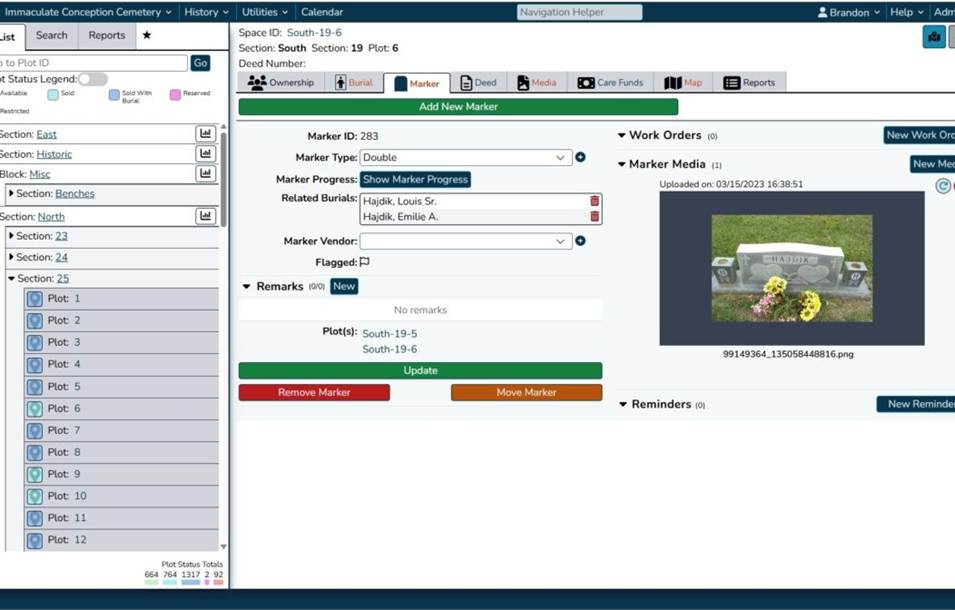
1. Reliable Data Management
Many small cemeteries still rely on handwritten ledgers, spreadsheets, or outdated desktop programs. Over time, these systems become difficult to maintain and nearly impossible to search.
Look for software that offers:
- Centralized digital records
- Easy search and filtering
- Secure cloud storage
- Tools for tracking ownership, burials, deeds, and plot history
A strong data foundation reduces errors, improves customer service, and protects historical information for future generations.
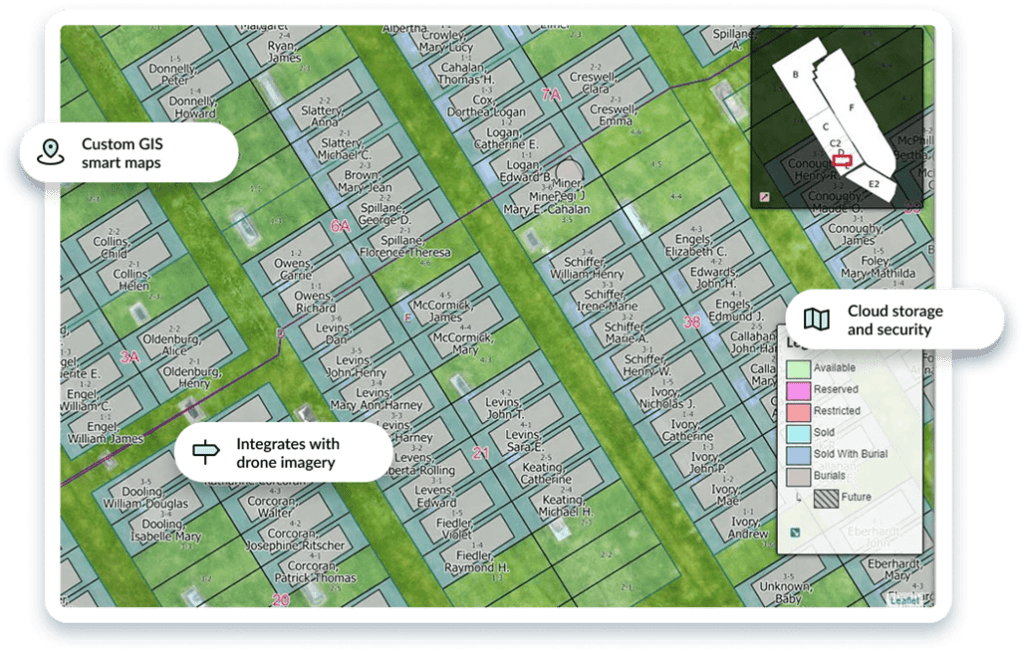
2. Digital Cemetery Mapping
Accurate maps are one of the biggest pain points for small cemeteries. Paper maps fade, get lost, or become outdated as plots fill.
Modern cemetery mapping should include:
- Interactive digital maps
- Visual plot status (available, sold, reserved, occupied)
- GPS‑based accuracy
- The ability to attach records directly to map locations
Digital mapping helps staff answer questions quickly and eliminates confusion during burials, lot sales, and genealogy requests.
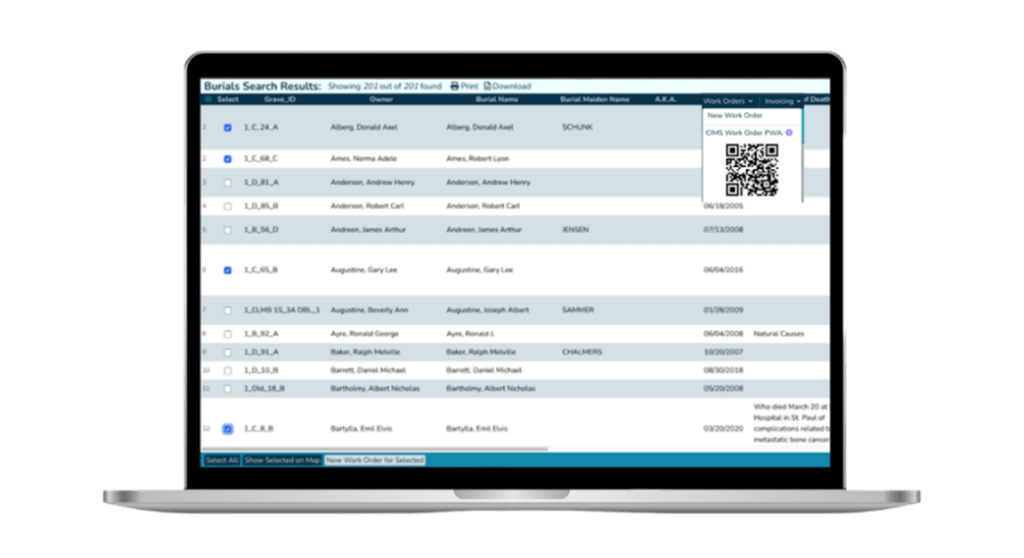
3. Work Order and Task Management
Small teams often juggle mowing, maintenance, burials, monument repairs, and administrative tasks—sometimes with only one or two staff members.
Work order tools help by:
- Assigning and tracking tasks
- Documenting maintenance history
- Ensuring nothing falls through the cracks
- Improving communication between grounds crews and office staff
This is especially valuable for cemeteries that rely on seasonal or volunteer labor.
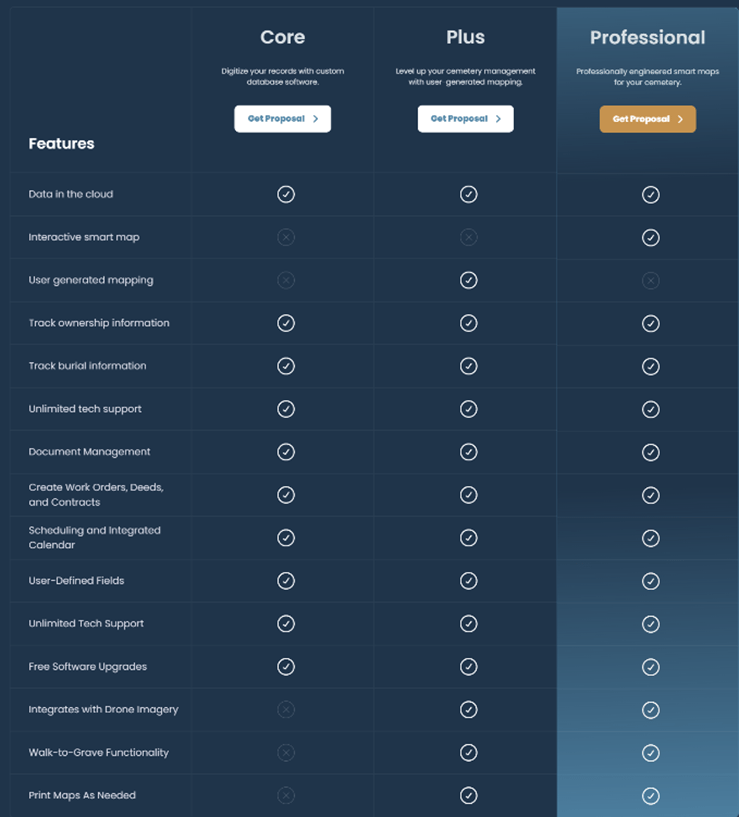
4. Affordability and Scalability
Small cemeteries need software that fits their budget and grows with them. Look for:
- Transparent pricing
- No required hardware
- Cloud‑based access
- Optional add‑ons rather than expensive bundles
The best cemetery software for small cemeteries offers flexibility without sacrificing essential features.
Why Customer Support Matters More for Small Cemeteries
Even the best software becomes frustrating without responsive support—especially for small cemeteries that may not have dedicated IT staff.
When evaluating providers, consider:
- Migration support: Will the vendor help convert paper records or legacy data?
- Training: Are onboarding sessions included? Are they tailored to small teams?
- Ongoing help: Is support available by phone, email, or chat?
- Documentation: Are there tutorials, videos, or guides for new users?
Small cemeteries benefit most from vendors who act as long‑term partners, not just software providers.
Which Cemetery Software Provider is Right for You?
There are several reputable cemetery software providers on the market today, but they don’t all solve the same problems in the same way.
In general, most cemetery software systems fall into three categories, each designed for different priorities and types of organizations. Understanding these categories can help you quickly narrow down the best fit for your cemetery.
1. Mapping-Focused Platforms
Best for cemeteries that primarily need to digitize maps and improve public search.
Some providers focus heavily on digital mapping and visualization, helping cemeteries move away from paper maps and offer a cleaner, more modern experience for visitors.
These systems typically include:
- Interactive Maps
- Public burial search tools
- Basic record management
2. Operations-Focused Platforms
Best for cemeteries looking to manage day‑to‑day workflows, contracts, and customer interactions.
Other providers focus on operational management, offering tools for:
- CRM and customer communication
- Contract and sales management
- Scheduling and work orders
- Financial tracking
These platforms are often positioned as all‑in‑one business systems, helping cemeteries streamline administrative tasks and improve internal workflows.
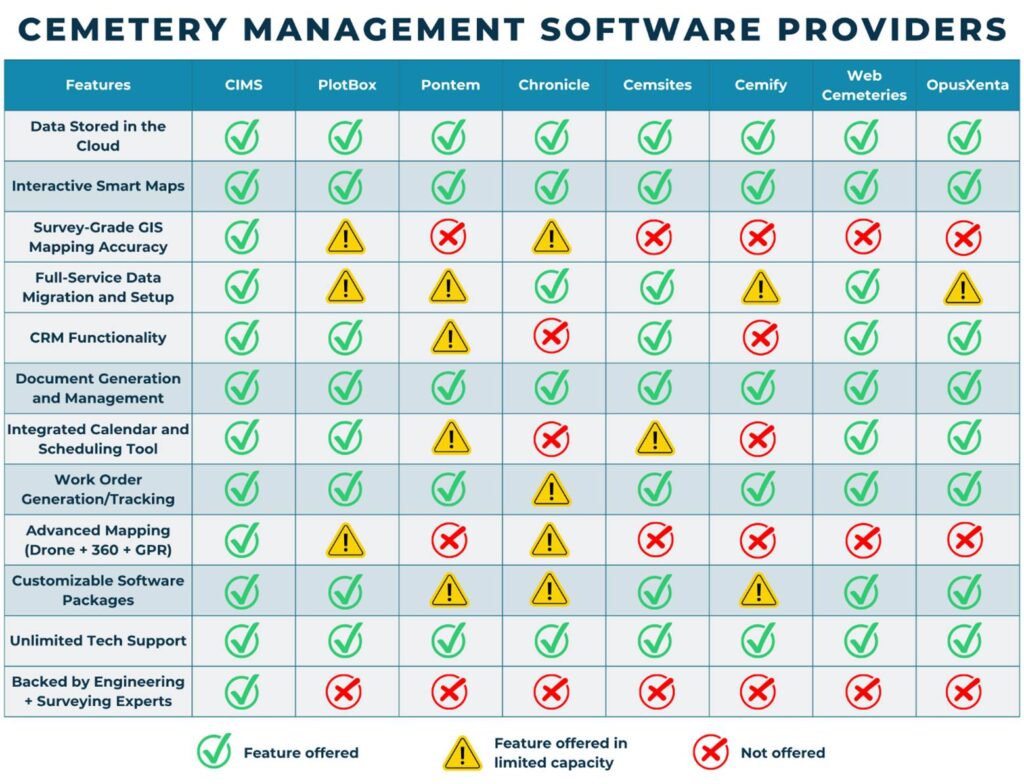
However, mapping capabilities in these systems can vary, and may not provide the same level of precision or integration as more specialized GIS‑based solutions. Systems like PlotBox, WebCemeteries, and OpusXenta, can be a strong fit for larger organizations or cemeteries with more complex operational structures, but may feel overly complex or unnecessary for smaller teams.
3. Hybrid Platforms (Mapping + Operations)
Best for cemeteries that need both accurate mapping and complete management tools in one system.
A third category combines the strengths of both approaches, integrating:
- Detailed digital mapping
- Full record and data management
- Work orders and operational tools
- Customer and ownership tracking
These systems, like CIMS, CemSites, and Pontem, aim to provide a single source of truth, eliminating the need for multiple tools or workarounds.
However, not all hybrid platforms are equal. Some offer standard feature sets, while others deliver more advanced capabilities like configurable workflows, deeper integrations, or enhanced mapping accuracy.
Where CIMS Stands Apart
While several platforms fall into the hybrid category, CIMS distinguishes itself by taking a more specialized, high‑precision approach, particularly for cemeteries dealing with complex historical records or mapping challenges.
With CIMS, cemeteries benefit from:
- Survey‑grade GIS mapping for greater accuracy
- Integrated records and mapping in a single system
- Full‑service data migration and onboarding support
- Customizable software tailored to each cemetery’s needs
This makes CIMS especially well‑suited for small to mid‑sized cemeteries that need a trusted, long‑term solution to modernize operations without increasing complexity.
Comparing Your Options
To help you evaluate how these providers stack up across key capabilities—including mapping accuracy, operational tools, customization, and support—see the comparison chart below.
So, What’s the Best Cemetery Software for Small Cemeteries?
The answer depends on your priorities—but for most small cemeteries, the ideal solution is one that balances ease of use, accuracy, operational functionality, and long‑term support.
- If you want a simple, mapping‑focused tool, a lightweight platform may be a good starting point
- If your priority is business operations and workflow management, an operations‑focused system may be a better fit
- But if you want a complete, future‑ready system that handles mapping, records, and daily operations together, a hybrid solution like CIMS offers the strongest long‑term value
Choosing a cemetery software program is a long‑term decision. The right system should make daily operations easier—not more complicated—and should protect your cemetery’s historical records for generations to come. If you’re evaluating cemetery software for a small cemetery and want to understand how digital mapping, data migration, or work order tools could work for your cemetery, exploring a demo of CIMS is a great next step. Or, if you’re ready to get the process started, you can request a quote for your cemetery here